 NetWise
Station Sim for protocol-true testing
Import the SCD. Set IED bind IPs. Start the servers. Load the Signal List. Watch 61850 live values. Connect IEC870. Play closed-loop tests against live 104 feedback.
Workspace
Six views. One project file.
Station, Signal List, 61850 live status, Goose Monitor, IEC870, and
Events share a single *.nwsproj file — plus IEC 61850
Runtime Setup for every IED.
Station
SCD single-line, IED start/stop, Tag List, Properties, and report controls (RptEna).
Signal List
Alarms, Indications, Measurements, and Commands from Excel — IOA, type ID, CA, CLT Play.
61850 live status
Add dataset variables, watch in-process values, write, and update text while IEDs run.
Goose Monitor
Published and subscribed GOOSE variables with live values and write, beside 61850 live status.
IEC870
IEC 104 master connect, live receive monitor, C104/C101 ready, mapped IOAs per category.
Events
Application Event Log with Normal, Warning, and Error — VIP, master, and mapping diagnostics.
Inside the product
See the workspace
Real NetWise screens — Station SLD, Signal List categories, live 61850, IEC 61850 Runtime Setup, IEC870, and Events.
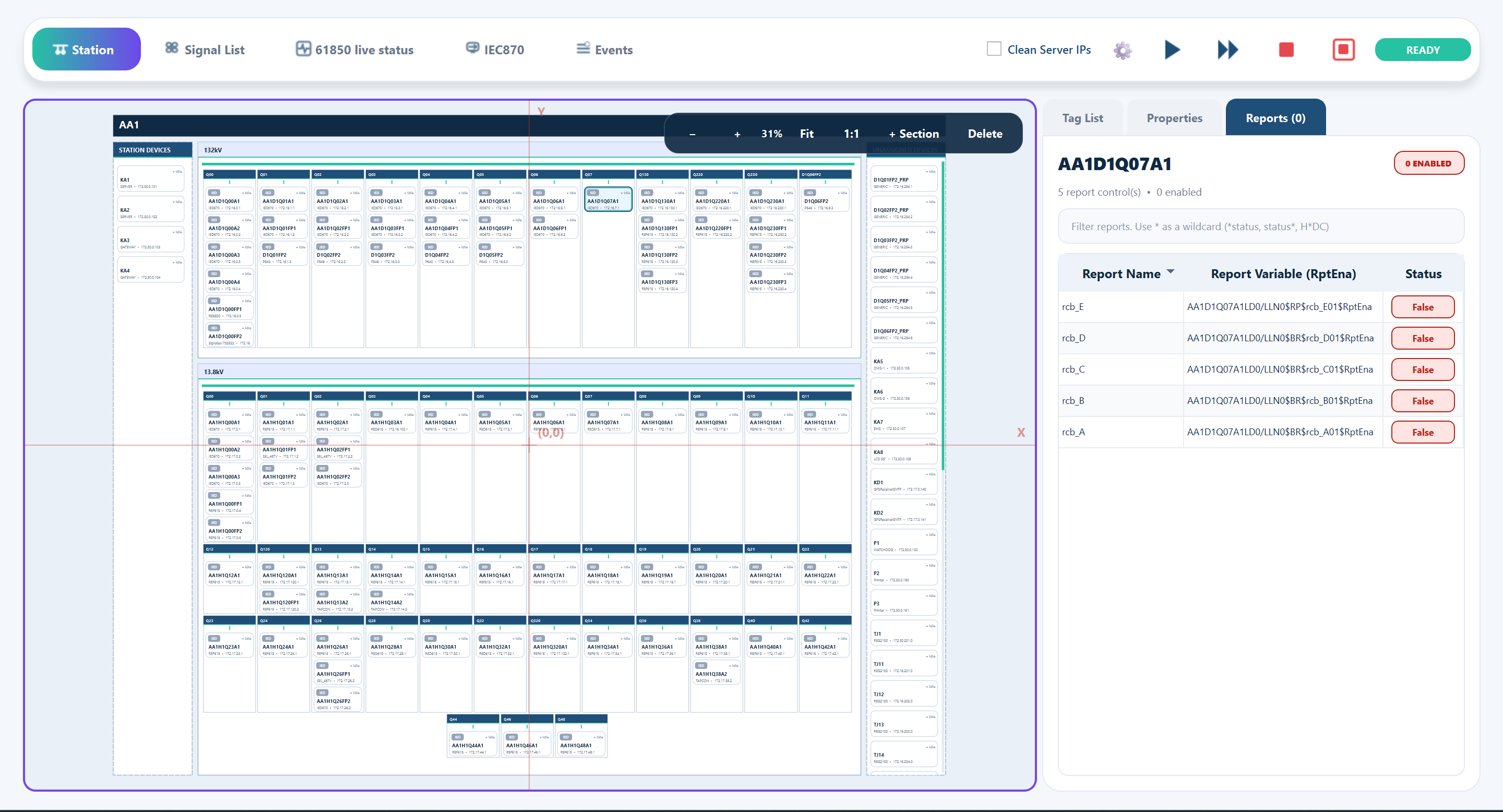
Station
Single-line, IEDs, and reports
Voltage levels and bays on the SLD. Select an IED for Tag List, Properties, and report controls — RptEna stays False until a client enables it.
Operator flow
From SCD to closed-loop result
Built for commissioning floors where the next step has to be obvious.
-
Import the station SCD
Voltage levels, bays, and IEDs land on the Station SLD with Tag List and report controls.
-
Set IEC 61850 Runtime Setup
Auto Start, server bind IP, MMS port 102, Enable Assigned Reports, and GI After Enable — then validate.
-
Start simulated IEDs
Publish MMS on the Station LAN adapter, or Skip and publish virtual IPs later when Ethernet is connected.
-
Load the Signal List
Import Alarms, Indications, Measurements, and Commands from Excel. Map LN to IOA / CA / type ID.
-
Watch 61850 and GOOSE
61850 live status and Goose Monitor show in-process values. Write a variable without leaving the workspace.
-
Connect IEC870 and Play
IEC 104 master to the gateway. CLT Play needs Connected. ✔ only on matching live 104 feedback.
Closed-loop
Pass only when the loop is real
-
Live master required
CLT Play stays blocked until IEC870 is Connected. No green tick without live 104 feedback.
-
Exact match criteria
Pass means matching CA/IOA ON value — and for Alarms/Indications, exact MMS ↔ 104 timestamp alignment.
-
Safe digital restore
On digital feedback fail, NetWise restores the simulated point to OFF so the next run starts clean.
Get started
Download → install → trial license
-
Sign up and download
Get the Windows installer and manuals from the Downloads page.
-
Install and open License
In NetWise: Help → License → Request Trial License (copies your Machine ID).
-
Submit the trial form
We store the request and email your machine-locked .nwlic file.
Import your station. Play the loop.
Download NetWise, then request a trial license for your PC.